Posts

Showing posts with the label nginx

How to fix: Nginx proxy or fastcgi cache always MISS or EXPIRED

Image
I've recently had an issue with my Nginx setup: it wasn't caching or serving cached pages properly. Every time I would visit, I'd get "MISS" or "EXPIRED". What I found online is that you have to instruct Nginx to ignore browser request headers relative to caching, therefore allowing Nginx to determine whether it should serve cache, all by itself. This is done by inserting the following directive: # ignore headers to let Nginx control its own cache fastcgi_ignore_headers Cache-Control Expires; However, I already had this in my configuration and it wasn't helping. After investigating the issue, I determined that my PHP scripts were updating cookies at every request. Nginx was forced to execute the PHP scripts via FastCGI (ie. not serving them from cache) because the cookie data had changed. When PHP sets a cookie, Nginx will not hit the cache, which is normal behavior. I wouldn't recommend changing this behavior. What I di...

Nginx HTTP Server - 4th edition now available

Image
Thanks to the amazing work of Martin Fjordvald , the 4th edition of Nginx HTTP Server (which was, at the time of the 1st edition, the first-ever book about Nginx) is as of today available for purchase in libraries and online. Congratulations Martin! This book is a detailed guide to setting up Nginx in ways that correspond to actual production situations: as a standalone server, as a reverse proxy, interacting with applications via FastCGI, and more. In addition, this complete direct reference will be indispensable at all stages of the configuration and maintenance processes. This book mainly targets the most recent version of Nginx (1.13.2) and focuses on all the new additions and improvements, such as support for HTTP/2, improved dynamic modules, security enhancements, and support for multiple SSL certificates.  This book is the perfect companion for both Nginx beginners and experienced administrators. For beginners, it will take you through the complete process of set...

Nginx: set up a LetsEncrypt SSL certificate with auto-renewal in 3 easy steps

Unless you have been living under a rock for the past year, you should know by now that you can get SSL certificates free of charge from LetsEncrypt , without registration, and with automatic renewal! This is one of the best thing that's happened to web admins and the web in general in the recent years. The certificates are authentic and work great in all browsers (you get the little green lock icon like everywhere else). Let's get straight to the point. The three steps are summarized here: 1) Download LetsEncrypt (the application) for your Linux server 2) Run the application to generate a certificate for your domain and set up the monthly auto-renew cron job 3) Add the certificate to your Nginx configuration. Step 1: download LetsEncrypt Install git if you haven't done so yet: # apt-get install git Use git to get the application and store it somewhere (ie: /root/temp) # git clone https://github.com/letsencrypt/letsencrypt /root/temp/letsencrypt ...

Nginx and LetsEncrypt SSL certificate problem with iOS and Safari (fixed)

Image
I have recently started using LetsEncrypt as my main SSL certificate supplier, it's amazing! With the auto-renew cron task, I have literally 0 work to do to keep certificates up to date, and of course, it's free. I recently noticed an issue though: when I visit my websites over HTTPS on my iPhone (and reportedly the problem exists with Safari on Mac OS X as well), the sites simply will not load. This is the error I get: The error reads: " Safari cannot open the page because the network connection was reset. The server may be busy ". After trying to sort out the problem for hours and Googling up the error everywhere, I finally stumbled upon this forum thread . Well thank you Mr. Duckson because that really did fix the problem! The solution: in your server {  ... } block, insert the ssl_session_cache directive with whatever value you deem fit. Example from Nginx documentation:  ssl_session_cache shared:SSL:10m ; Save your configuration, reload Ngi...

Get Nginx HTTP Server 3rd Edition and any other book from Packt Publishing for just $5

Image
Dear readers, bloggers, fellow administrators, I have been informed by my excellent publisher Packt Publishing that they are currently running an amazing offer: you can get any of their books for just $5. This includes my recent publication - Nginx HTTP server 3rd edition . The promotion started yesterday and will last until New Year. Hurry up and get as many books as you can before the promotion ends!

Nginx HTTP Server - Third Edition now available!

Image
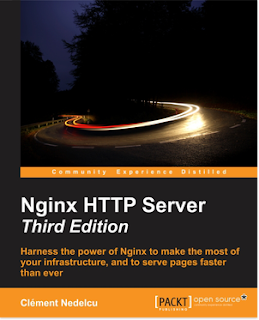
I am glad to announce that the third edition of "Nginx HTTP Server" (the book) is now available! You can already buy the ebook over at Amazon.com or directly from Packt Publishing . Paperback version will follow on December 1st. Aside from the numerous corrections, chapter overhauls, and section rewrites, this new edition comes with two entirely new chapters: an introduction to load balancing and optimization real life case studies, starting from scratch It is much more practice-oriented, focusing on examples rather than endless directive bullet lists. We learned a lot from reader reviews and I can safely say that this edition is the best by far! Congratulations to everyone who's been working hard on the project over the past months - especially Siddhesh, Kirti, and Indrajit!  If you are interested in getting a free copy of this book (ebook version), please feel free to post a comment here. I will get back to you quickly!

HTTPS with Nginx: setting up an SSL certificate in 3 simple steps

This article will explain how to serve content securely over HTTPS via Nginx . This can be done in 3 simple steps detailed below. It's unbelievably easy! I've even added an optional step for optimization, and links for further readings. The three steps are as follows: Step 1: preparing your private key and CSR  Step 2: obtaining an SSL certificate Step 3: Nginx SSL configuration This post is valid as of October 2014, tested with Nginx 1.2, Nginx 1.4 and Nginx 1.6 (probably works with every version above 1.2). For older versions, directive names might change just a tiny bit but the rest of the process should otherwise work normally. Requirements You will need to have OpenSSL installed on your server. To find out whether OpenSSL is installed on your server, type " openssl version ". It should tell you the version you are running. I recommend version 1.0.1 at least because it supports several features which will come in handy in future tutorials (inc...

Nginx error 413: Request entity too large Quick Fix

A quick article today about a common error people encounter with Nginx: the infamous 413 Request Entity Too Large HTTP error. I had the problem myself just yesterday on one of my newly configured servers, so I thought I'd make a blog post about it to make sure I don't forget this next time. Error 413: what does it mean? This error shows up when a visitor sends too much data in the HTTP request. This is normally caused by: • an overy large file being uploaded by the visitor • more generally too much POST data being sent by the client The fix is as simple as setting a directive in your Nginx configuration, read on below. How to fix it? client_max_body_size To fix this, you need to increase the value of the client_max_body_size directive. This directive defines the maximum amount of data Nginx will accept in an HTTP request. By default this value is set to 1 megabyte, meaning if you attempt to upload a file larger than 1 megabyte you'll be getting an  Error ...

LimeSurvey Nginx rewrite rules

I just downloaded LimeSurvey, an amazing free open-source project for creating your own online surveys , and was about to install it on my own Nginx-powered server. To my surprise, there are no available Nginx rewrite rules for it on the official project website, and I didn't even find any blog post detailing such rules. So here I go again, filling the voids. This post details: - the Nginx rewrite rules translated directly from the provided .htaccess file, the small server configuration file containing the rewrite rules for Apache. - what to do after installing LimeSurvey Nginx rewrite rules The original rewrite rules for LimeSurvey are contained in this simple .htaccess file: <IfModule mod_rewrite.c>   RewriteEngine on     # if a directory or a file exists, use it directly     RewriteCond %{REQUEST_FILENAME} !-f     RewriteCond %{REQUEST_FILENAME} !-d     # otherwise forward it to index.php     RewriteRule . inde...

JWPlayer: remembering position in video, to resume playback later

As part of my recent developments on my upload site Filetrip.net, which comes with interesting video playback capabilities, I've added the possibility for visitors who watch a video once and interrupt playback to return to the video later on and resume where they left off. In short: you are watching a video, you suddenly or accidentally close the tab or visit another site. When you go back to the video page and start playing again, the video will resume where you left off. I was wrong to assume that this was an upcoming feature for JwPlayer, seeing as one of the authors stated that they " don't support this explicitely ". So I designed it myself with minimal coding. Note that this has been tested on JWPlayer 5 and above, but I cannot guarantee that it will always work in the future. Here is how I am going to detail this tweak: 1. Introduction and requirements 2. Remembering the position 3. Setting the starting offset 4. Cookie data limitations Intro...

Nginx market share soon to hit 10% mark

Image
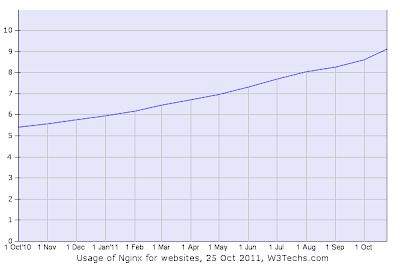
According to multiple sources such as: NetCraft's July 2011 Web Server survey W3tech's Web server usage statistics as of October 25 the amazing and lightning-fast web server known as nginx is just about to hit the 10% market share mark in the next couple of months. This is a fantastic milestone for the author, Igor Sysoev , who probably didn't imagine that the application (which he originally developed on his own) would meet such fame. Diagram courtesy of W3Techs.com (article linked above). Its market share went from a little over 5% to almost 10% over the last year as you can see.  I wouldn't go so far as to say that the release of my Nginx HTTP Server book  (released Summer 2010) was one of the factors that contributed to the popularity of the Russian web server. It is my belief that the sole quality and efficiency of the software is what made its success. The book was and is being translated into three languages: In Japanese In Chinese (t...

"Nginx HTTP Server" book published

Nginx HTTP Server was published and is now available for purchase on various locations. It will begin to appear in store in the coming weeks. You can already purchase the eBook from the publisher's website at the link below: https://www.packtpub.com/nginx-http-server-for-web-applications/book The eBook can be purchased for 23.79€ whereas the book is 31.49€. There is also a preview chapter available on the website for anyone to read! Please feel free to leave your comments, feedback and questions if you have read the book.

Nginx HTTP Server: the book

Image
Hello, I am glad to to announce the first Nginx book on the market: Nginx HTTP Server , written by... me . :-) NGINX HTTP SERVER "Adopt Nginx for your web applications to make the most of your infrastructure and server pages faster than ever." Focused on the primary aspect of Nginx (HTTP serving), the book covers the following topics: Get started with Nginx to serve websites faster and safer Learn to configure your servers and virtual hosts efficiently Set up Nginx to work with PHP and other applications via FastCGI Explore possible interactions between Nginx and Apache to get the best of both worlds A step-by-step guide to switching from Apache to Nginx Complete configuration directive and module reference There are 8 chapters and 3 appendices, listed here: 1. Preparing your work environment: getting ready to work under a command-line environment, with a reminder on the basic tools and commands. 2. Downloading and installing Nginx : downloading the source, th...

Nginx & PHP via FastCGI important security issue

A critical security issue has recently been pointed out on servers that run Nginx and PHP via FastCGI. The issue allows anyone to execute their own PHP code on the system, I don't think I have to remind you of the consequences this could have. I will attempt to provide a simple explanation of the issue and more importantly how to fix it. What is the issue? I would like to begin by discussing the nature of the problem: it is not caused by Nginx itself - it is not a bug or a security breach in itself. Actually, it is the way that people usually configure Nginx FastCGI options to work with PHP, and how PHP reacts to that configuration. Pretty much everyone adopts the same configuration without being aware of the issue. The issue itself can be understood simply, then I will explain why PHP behaves that way. Most dynamic websites allow for a reason or another uploading of files. Say, I'm running a forum-based community, users can upload images to use as personal photo or ava...

Dealing with Nginx 400 Bad Request HTTP errors

Today I'll write about something I experienced personally, on my websites. Some visitors reported that they were getting a "400 Bad Request" Nginx error randomly when visiting pages. And when they start getting that error, they can't access the site anymore: it'll output the same error no matter the page, until you "clear your cache and cookies". The error is easily understandable and is likely to be caused by... too much cookie data. Every time a visitor loads *any* page/content/file of your website, it sends the cookie data to the server. Cookie data is sent under the form of 1 header line starting with "Cookie: ". Basically, Nginx by default is configured to accept header lines of a maximum size of 4 kilobytes. When a line in the headers exceeds 4 kilobytes, Nginx returns the '400 Bad Request' error. Cookie data sometimes gets big, so it causes the error. It particularly happens on forums like vBulletin, Invision and others...

Setting up nginx as reverse proxy on Linux Centos 5.2 (and Plesk 9)

Following my blog article on optimizing your web server by using nginx and memcached, I'll now detail the first step: setting up nginx as reverse proxy on your server. This is going to be a bit tricky, and you'll be getting your hands dirty, so be warned. What does this consist in? Well basically, your website will be served by two daemons: nginx for the static content (images, js, css, html...) and Apache for the dynamic content. Nginx will be listening on port 80, will serve static content to visitors, and redirect any dynamic data query to Apache, running on another port -- in our case we'll be using port 8080. What is nginx? Nginx is a lightweight open-source http daemon (http server). It is said to be extremely fast, a lot more than Apache, and I have to admit by personal experience this seems to be very true. Using nginx for serving static content dramatically improved the speed of my high traffic website. Actually, some major websites such as Wordpress.com, *co...

The final solution: nginx+apache2 and memcached

Been a while! But I'll make up for the huge time gap: this post will probably be one of the most useful I'll ever post. I happen to be running a high traffic website, have been running it for about 5 years now. Over the past few years though, my website has known a major traffic increase which resulted in my servers being regularly cluttered and my website inaccessible. My website profile: an Invision Powerd Board based website (heavily modded though), running under PHP 5 and MySQL 5. Servers are hosted in France at OVH.com. At first, my reasoning was quite simple: spend more money on a more powerful server. I ran about 5 or 6 server upgrades over the years. I must say it worked at first, since I was running low-end servers. But for the last couple of months the traffic became way too high, which resulted in my website being completely inaccessible for a part of the world (for visitors in remote countries such as Canada, connections frequently timed out) and just plain slow for...