Posts

Clickatell vs MessageBird vs Nexmo vs Plivo vs Tropo vs Twilio: outbound SMS pricing comparison

Image
DISCLAIMER : I am not affiliated in any way to any of those companies. I'm an independent software developer. This article is based on pricing data collected on May 2018. As I was looking for a provider to send SMS internationally from a web application (one-way), I was recommended a variety of services by friends and colleagues. My main concern was the pricing: which of them would offer me the cheapest rates in the most countries? Obviously the answer isn't that simple, so I decided to collect pricing information from major providers to compare. I tried including SMSGlobal in this comparison but they wouldn't provide me with a full list so I had to exclude them. Methodology There are three important pieces of information that you absolutely need to grasp before you continue reading this article: •  The prices I have collected do not include bulk discounts . Most, if not all providers offer such discounts if you talk to their sales department. The rates I have ...

Nginx HTTP Server - 4th edition now available

Image
Thanks to the amazing work of Martin Fjordvald , the 4th edition of Nginx HTTP Server (which was, at the time of the 1st edition, the first-ever book about Nginx) is as of today available for purchase in libraries and online. Congratulations Martin! This book is a detailed guide to setting up Nginx in ways that correspond to actual production situations: as a standalone server, as a reverse proxy, interacting with applications via FastCGI, and more. In addition, this complete direct reference will be indispensable at all stages of the configuration and maintenance processes. This book mainly targets the most recent version of Nginx (1.13.2) and focuses on all the new additions and improvements, such as support for HTTP/2, improved dynamic modules, security enhancements, and support for multiple SSL certificates.  This book is the perfect companion for both Nginx beginners and experienced administrators. For beginners, it will take you through the complete process of set...

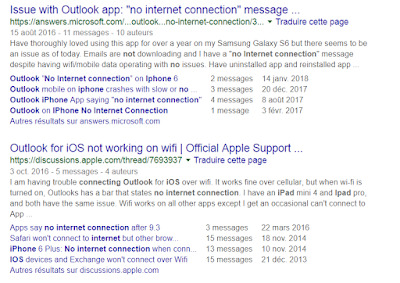
How to fix: Outlook on iOS/iPhone: "No Internet Connection"

Image
Microsoft Outlook is probably one of the best (if not the best) email client for iOS to date. Sadly, you may run into a random annoying problem which basically renders the application useless: it displays a message saying " No internet connection ", at which point you can't receive or send emails anymore. The number of people having this issue is incredibly high, as I discovered when it happened to me yesterday: After reading all of these posts and many more, there did not appear to be a particular solution for this. I had already checked the following: my Internet was of course working properly, on both WiFi and 4G I made sure to allow data/internet usage for the Outlook app I made sure my email accounts were working properly (they work fine on the Outlook desktop app & web) I tried enabling or disabling push notifications but that did not help I tried to use the 'reset account' functionality in the Outlook app settings for each of the accoun...

VPNAutoConnect 1.0 for Windows: automatically connect and reconnect to a VPN

Image
I am releasing a handy little tool I have been working on called VPNAutoConnect . It does a couple of simple things Windows won't let you do (at least not easily): - automatically reconnects to a VPN when the connection is lost - connects to a VPN on computer start-up - logs VPN connection events for debugging I designed this tool because I have been using a VPN for a while but I randomly get disconnected. I wish Windows offered an option to automatically reconnect but strangely there isn't an easy, straightforward way to do that (as of today). With this tool, not only my VPN connection is started when I boot my computer, but it always reconnects automatically after I get those random disconnects. This is a free open source program designed with Visual Studio Community 2015. It requires the .NET framework 4.5.2, and it makes uses of the DotRas library. - Download program from here : vpnautoconnect-1.0.zip  ( SHA1 ) - Download sources from here : vpnautoconnect-1.0...

Simple VPN autoconnect for Windows 8 and 10

Since Windows 7, for some reason VPN support in new Windows versions has annoyingly decreased in quality. You can't create shortcuts to VPNs on the desktop or in the start menu anymore; you can't set up a VPN connection to automatically connect on start up; and with Windows 10 there is even a bug (at the time of writing this article) that makes you click on another connection item in the list before the Connect button appears. The simplest way to achieve automatic VPN connection on computer start-up is to create a batch/cmd file with the following command: rasdial "VPN Connection" username password Where: - rasdial is the name of the command-line utility that will perform the connection - replace "VPN Connection" by the actual name of the VPN connection - replace username by your actual VPN user name - replace password by your actual VPN password If you want the VPN connection to be started when you log on, simply place this batch script into ...

Solution for "DOMException: Failed to load because no supported source was found" error in Chrome with HTML5 media API

After updating Chrome to release 53 this week, my web application was no longer able to use the media API to capture video with a webcam. This is the third time that I am forced to update my code due to changes in Chrome... this is getting a little annoying! The error message I was getting in my javascript console is: DOMException: Failed to load because no supported source was found I'll keep it short. The problem was the way I set the source of my media element. I was setting the source like this: navigator.getUserMedia(videoObj, function(stream) {    CaptureImageStream = stream;    CaptureImageVideo.src = stream ;    CaptureImageVideo.play(); }, errBack); It seems like this is no longer supported. I changed it to this and it now works again: navigator.getUserMedia(videoObj, function(stream) {    CaptureImageStream = stream;    CaptureImageVideo.src = window.URL.createObjectURL(stream) ;    CaptureImageVi...

Nginx: set up a LetsEncrypt SSL certificate with auto-renewal in 3 easy steps

Unless you have been living under a rock for the past year, you should know by now that you can get SSL certificates free of charge from LetsEncrypt , without registration, and with automatic renewal! This is one of the best thing that's happened to web admins and the web in general in the recent years. The certificates are authentic and work great in all browsers (you get the little green lock icon like everywhere else). Let's get straight to the point. The three steps are summarized here: 1) Download LetsEncrypt (the application) for your Linux server 2) Run the application to generate a certificate for your domain and set up the monthly auto-renew cron job 3) Add the certificate to your Nginx configuration. Step 1: download LetsEncrypt Install git if you haven't done so yet: # apt-get install git Use git to get the application and store it somewhere (ie: /root/temp) # git clone https://github.com/letsencrypt/letsencrypt /root/temp/letsencrypt ...