Posts

Talk-to-ChatGPT: a Google Chrome extension to actually talk to the AI

Image
Talk-to-ChatGPT  is a Google Chrome extension that allows users to talk with the ChatGPT AI using their voice (speech recognition), and listen to the bot's answer with a voice (text-to-speech), rather than just by typing. With this tool, users can speak to the AI and receive spoken responses, making the interaction feel more natural and conversational. This could be useful in a variety of settings where it would be helpful to have a more human-like interaction with an AI. After installing the Google Chrome extension, open or reload the ChatGPT page (  https://chat.openai.com/chat  ) and you should be seeing a 'Start' button on the top right corner of the page. After you click Start, you will be asked for permission to use your Microphone. This is required to enable voice recognition. Get the extension here from the Chrome Web Store:  https://chrome.google.com/webstore/detail/talk-to-chatgpt/hodadfhfagpiemkeoliaelelfbboamlk  Not to be confused with the other exte...
Page Title Change Detector: a simple Windows program to detect changes in web page titles at regular intervals

Image
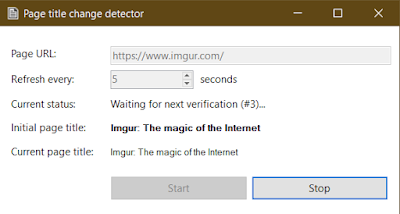
Page Title Change Detector is a tiny Windows utility program written in C# that downloads a web page's source code at a regular interval and alerts you when the title changes. This program offers one simple functionality: Select an interval (in seconds) Enter the URL of a web page Press 'Start' When you press 'Start', the program will retrieve the page title once and set it as 'Initial page title'. Then it will redownload the same page regularly at the specified interval. If a change is detected, the program stops checking, emits a sound, and displays an alert message box. Requirements: Microsoft Windows .NET Framework 4.5.1+ Internet connection This program does not require any installation. It doesn't save any settings, or file, or anything anywhere. Just download the .exe file and run it. Download by clicking here (.zip) The full source is available on GitHub  if anyone wants to make improvements or check out the code.

Top 3 fixes for: Lenovo Yoga S730 shuts down without warning under Windows 10

Image
I've recently purchased this nice little beast: the Lenovo Yoga S730-13IML laptop (81U40018SB) 10th-generation Intel Core i7-10510U (4C / 8T, 1.8 / 4.9GHz, 8MB) 16 GB RAM 1 TB SSD 13.3" 1080p screen 3x USB-C ports 42W battery Fingerprint sensor I've been using the standard Windows 10 Home OS that came with it and set the power plan to 'Maximum performance'. I wanted to ensure I'd get my money worth in terms of computing power. I noticed the laptop was getting a bit hot but without any particular issue. After a few weeks of use, I started getting unexpected shutdowns . In a single morning three consecutive shutdowns without warning. The screen goes black, power LED goes off, it's like the juice is gone. I can turn it back on immediately but once it gets hot again (or so I suspect) it shuts down again.  I tried changing settings back and forth and finally found a configuration that doesn't crash anymore, so I thought I would share it wi...

Singap.FR: une communauté en ligne pour les touristes et expatriés francophones

Image
Un petit coup de main pour un ami: je fais passer le message. Le site Singap.FR vient d'ouvrir: il s'agit d'un site communautaire dédiée à la diaspora française et francophone de Singapour, ayant également un but informatif pour les touristes visitant ou souhaitant visiter Singapour. Cette communauté française de Singapour , riche de 15 000 résidents permanents et de nombreux touristes, se dote donc d'un vrai forum de discussion ouvert à tous, d'une page Facebook pour relayer ses articles, et même d'un catalogue des condos/résidences privées de Singapour, pour ceux qui cherchent plus d'informations ou souhaitent donner leur avis sur une résidence. Bon courage à mon ami Jimmy A. dans cette grande aventure.

How to fix: Nginx proxy or fastcgi cache always MISS or EXPIRED

Image
I've recently had an issue with my Nginx setup: it wasn't caching or serving cached pages properly. Every time I would visit, I'd get "MISS" or "EXPIRED". What I found online is that you have to instruct Nginx to ignore browser request headers relative to caching, therefore allowing Nginx to determine whether it should serve cache, all by itself. This is done by inserting the following directive: # ignore headers to let Nginx control its own cache fastcgi_ignore_headers Cache-Control Expires; However, I already had this in my configuration and it wasn't helping. After investigating the issue, I determined that my PHP scripts were updating cookies at every request. Nginx was forced to execute the PHP scripts via FastCGI (ie. not serving them from cache) because the cookie data had changed. When PHP sets a cookie, Nginx will not hit the cache, which is normal behavior. I wouldn't recommend changing this behavior. What I di...

Clickatell vs MessageBird vs Nexmo vs Plivo vs Tropo vs Twilio: outbound SMS pricing comparison

Image
DISCLAIMER : I am not affiliated in any way to any of those companies. I'm an independent software developer. This article is based on pricing data collected on May 2018. As I was looking for a provider to send SMS internationally from a web application (one-way), I was recommended a variety of services by friends and colleagues. My main concern was the pricing: which of them would offer me the cheapest rates in the most countries? Obviously the answer isn't that simple, so I decided to collect pricing information from major providers to compare. I tried including SMSGlobal in this comparison but they wouldn't provide me with a full list so I had to exclude them. Methodology There are three important pieces of information that you absolutely need to grasp before you continue reading this article: •  The prices I have collected do not include bulk discounts . Most, if not all providers offer such discounts if you talk to their sales department. The rates I have ...

Nginx HTTP Server - 4th edition now available

Image
Thanks to the amazing work of Martin Fjordvald , the 4th edition of Nginx HTTP Server (which was, at the time of the 1st edition, the first-ever book about Nginx) is as of today available for purchase in libraries and online. Congratulations Martin! This book is a detailed guide to setting up Nginx in ways that correspond to actual production situations: as a standalone server, as a reverse proxy, interacting with applications via FastCGI, and more. In addition, this complete direct reference will be indispensable at all stages of the configuration and maintenance processes. This book mainly targets the most recent version of Nginx (1.13.2) and focuses on all the new additions and improvements, such as support for HTTP/2, improved dynamic modules, security enhancements, and support for multiple SSL certificates.  This book is the perfect companion for both Nginx beginners and experienced administrators. For beginners, it will take you through the complete process of set...

How to fix: Outlook on iOS/iPhone: "No Internet Connection"

Image
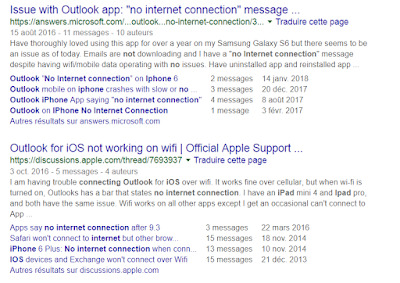
Microsoft Outlook is probably one of the best (if not the best) email client for iOS to date. Sadly, you may run into a random annoying problem which basically renders the application useless: it displays a message saying " No internet connection ", at which point you can't receive or send emails anymore. The number of people having this issue is incredibly high, as I discovered when it happened to me yesterday: After reading all of these posts and many more, there did not appear to be a particular solution for this. I had already checked the following: my Internet was of course working properly, on both WiFi and 4G I made sure to allow data/internet usage for the Outlook app I made sure my email accounts were working properly (they work fine on the Outlook desktop app & web) I tried enabling or disabling push notifications but that did not help I tried to use the 'reset account' functionality in the Outlook app settings for each of the accoun...

VPNAutoConnect 1.0 for Windows: automatically connect and reconnect to a VPN

Image
I am releasing a handy little tool I have been working on called VPNAutoConnect . It does a couple of simple things Windows won't let you do (at least not easily): - automatically reconnects to a VPN when the connection is lost - connects to a VPN on computer start-up - logs VPN connection events for debugging I designed this tool because I have been using a VPN for a while but I randomly get disconnected. I wish Windows offered an option to automatically reconnect but strangely there isn't an easy, straightforward way to do that (as of today). With this tool, not only my VPN connection is started when I boot my computer, but it always reconnects automatically after I get those random disconnects. This is a free open source program designed with Visual Studio Community 2015. It requires the .NET framework 4.5.2, and it makes uses of the DotRas library. - Download program from here : vpnautoconnect-1.0.zip  ( SHA1 ) - Download sources from here : vpnautoconnect-1.0...

Simple VPN autoconnect for Windows 8 and 10

Since Windows 7, for some reason VPN support in new Windows versions has annoyingly decreased in quality. You can't create shortcuts to VPNs on the desktop or in the start menu anymore; you can't set up a VPN connection to automatically connect on start up; and with Windows 10 there is even a bug (at the time of writing this article) that makes you click on another connection item in the list before the Connect button appears. The simplest way to achieve automatic VPN connection on computer start-up is to create a batch/cmd file with the following command: rasdial "VPN Connection" username password Where: - rasdial is the name of the command-line utility that will perform the connection - replace "VPN Connection" by the actual name of the VPN connection - replace username by your actual VPN user name - replace password by your actual VPN password If you want the VPN connection to be started when you log on, simply place this batch script into ...

Solution for "DOMException: Failed to load because no supported source was found" error in Chrome with HTML5 media API

After updating Chrome to release 53 this week, my web application was no longer able to use the media API to capture video with a webcam. This is the third time that I am forced to update my code due to changes in Chrome... this is getting a little annoying! The error message I was getting in my javascript console is: DOMException: Failed to load because no supported source was found I'll keep it short. The problem was the way I set the source of my media element. I was setting the source like this: navigator.getUserMedia(videoObj, function(stream) {    CaptureImageStream = stream;    CaptureImageVideo.src = stream ;    CaptureImageVideo.play(); }, errBack); It seems like this is no longer supported. I changed it to this and it now works again: navigator.getUserMedia(videoObj, function(stream) {    CaptureImageStream = stream;    CaptureImageVideo.src = window.URL.createObjectURL(stream) ;    CaptureImageVi...

Nginx: set up a LetsEncrypt SSL certificate with auto-renewal in 3 easy steps

Unless you have been living under a rock for the past year, you should know by now that you can get SSL certificates free of charge from LetsEncrypt , without registration, and with automatic renewal! This is one of the best thing that's happened to web admins and the web in general in the recent years. The certificates are authentic and work great in all browsers (you get the little green lock icon like everywhere else). Let's get straight to the point. The three steps are summarized here: 1) Download LetsEncrypt (the application) for your Linux server 2) Run the application to generate a certificate for your domain and set up the monthly auto-renew cron job 3) Add the certificate to your Nginx configuration. Step 1: download LetsEncrypt Install git if you haven't done so yet: # apt-get install git Use git to get the application and store it somewhere (ie: /root/temp) # git clone https://github.com/letsencrypt/letsencrypt /root/temp/letsencrypt ...

Nginx and LetsEncrypt SSL certificate problem with iOS and Safari (fixed)

Image
I have recently started using LetsEncrypt as my main SSL certificate supplier, it's amazing! With the auto-renew cron task, I have literally 0 work to do to keep certificates up to date, and of course, it's free. I recently noticed an issue though: when I visit my websites over HTTPS on my iPhone (and reportedly the problem exists with Safari on Mac OS X as well), the sites simply will not load. This is the error I get: The error reads: " Safari cannot open the page because the network connection was reset. The server may be busy ". After trying to sort out the problem for hours and Googling up the error everywhere, I finally stumbled upon this forum thread . Well thank you Mr. Duckson because that really did fix the problem! The solution: in your server {  ... } block, insert the ssl_session_cache directive with whatever value you deem fit. Example from Nginx documentation:  ssl_session_cache shared:SSL:10m ; Save your configuration, reload Ngi...

HTML5 video capture from browser: error with "stop() not a function"

A quick blog post about recent changes in the MediaStream API support in modern browsers. I had previously developed a function allowing users to capture images from their webcam, based on tutorials found on the web. Here was my code to initialize the capture canvas: function CaptureImageBeginCapture () { CaptureImageCanvas = $ ( "#ImageCaptureCanvas" )[ 0 ]; var videoObj = { "video" : true }, errBack = function (error) { console . log ( "Video capture error: " , error. code ); }; CaptureImageVideo = $ ( "#ImageCapturePreviewFrame" )[ 0 ]; CaptureImageContext = CaptureImageCanvas . getContext ( "2d" ); // Put video listeners into place if ( navigator .getUserMedia) { // Standard navigator .getUserMedia( videoObj , function (stream) { CaptureImageStream = stream; CaptureImageVideo . src = stream; CaptureImageVideo . play (); }, errBack ); } else if ( n...

3 PHP quizzes for testing your knowledge: beginner, medium, and advanced levels

Hello everyone, I have created three short quizzes for testing your PHP knowledge. They were meant to be used before job interviews as a way to provide a quick evaluation of the skill level of the applicant. They have served their purpose so I am releasing them to the public. If you really want to know your level, don't google up the answers while playing. Beginner : http://goo.gl/H9seNQ Medium : http://goo.gl/HBNezZ Advanced : http://goo.gl/5ESofc What was your score? Also, did you notice any errors in the questions? I know some of the answers can be up to debate (the regexp one in particular) but obviously if you know the answer you will pick the one that best matches what you think is the truth.  Also, keep in mind that while I consider these to be "beginner", "medium", and "advanced" levels, depending on your own skills you could laugh and consider me a newbie. It's just that from my perspective, if an intervi...

Get Nginx HTTP Server 3rd Edition and any other book from Packt Publishing for just $5

Image
Dear readers, bloggers, fellow administrators, I have been informed by my excellent publisher Packt Publishing that they are currently running an amazing offer: you can get any of their books for just $5. This includes my recent publication - Nginx HTTP server 3rd edition . The promotion started yesterday and will last until New Year. Hurry up and get as many books as you can before the promotion ends!

Outlook 2010 stuck in safe mode - just uninstall KB3114409

Image
Yesterday (December 9th, 2015) Microsoft rolled out a faulty update for Microsoft Office 2010 (KB3114409) which accidentally causes Outlook 2010 to start in safe mode systematically , ignoring registry and computer settings. To solve the problem, simply go to the "Programs and features" control panel applet, click on "View installed updates", search for KB3114409, and uninstall it . After you reboot your computer, Outlook will start normally again. This solution has been tested successfully at work for dozens of users. Microsoft stated: “ After you install this update, Outlook 2010 may start only in safe mode. If this issue occurs, uninstall the update. This update is no longer available now. " Source: Microsoft message boards

Nginx HTTP Server - Third Edition now available!

Image
I am glad to announce that the third edition of "Nginx HTTP Server" (the book) is now available! You can already buy the ebook over at Amazon.com or directly from Packt Publishing . Paperback version will follow on December 1st. Aside from the numerous corrections, chapter overhauls, and section rewrites, this new edition comes with two entirely new chapters: an introduction to load balancing and optimization real life case studies, starting from scratch It is much more practice-oriented, focusing on examples rather than endless directive bullet lists. We learned a lot from reader reviews and I can safely say that this edition is the best by far! Congratulations to everyone who's been working hard on the project over the past months - especially Siddhesh, Kirti, and Indrajit!  If you are interested in getting a free copy of this book (ebook version), please feel free to post a comment here. I will get back to you quickly!

Disqus comments, 3rd edition, 2 million page views

Just a quick update that most likely no one will read, but here it is anyway: I have switched comment systems, we're now with Disqus. Blogger did a terrible job at preventing spam so I'm hoping I'll get luckier with Disqus. I removed about 2000 spam comments so far. Nginx HTTP Server , 3rd edition is coming up soon ! The first draft is complete. After checking out user reviews online we decided that this edition should focus on examples and case studies, rather than standing for the ultimate directive reference or index. The first edition from 2009/2010 was meant as an exhaustive reference that people could use at all times, but several readers complained that the information was readily available online. We never pretended otherwise but we tried to make the documentation in the book more accessible and legible. Hopefully this new edition will prove satisfying to all. 2 million page views on the blog - we're almost there! In a couple of days the amazing milestone o...

How to fix: jQuery UI progress bar not animating when indeterminate value

Once again I find myself in this situation: - I run into a small problem - I google it: can't find a solution - Try to fix it myself: success I am hoping that by posting this article I will help out a person or two. UPDATE :  a day later, the problem is back, this post is thereby useless. If you know a proper solution I'm all ears! ;-( What's the problem? The jQuery UI progress bar widget is useful in a lot of situations and it's easy to use. When you set its value to "false" (indeterminate/unset), the progress bar animates nicely. The end user feels like something is actually happening.  The problem I've been having is that the progress bar RANDOMLY doesn't animate in my project. I'm sure I must have done something wrong at some point, but the project is so huge that it would take too long to root out the issue on my end. As a result, my users are under the impression that my application has crashed and they reload the page (...